DirMeta
See where your disk space goes
A fast disk space analyzer. Scan directories, analyze archives, save snapshots, and visualize usage with Tree, List, TreeMap, and Ring Chart views.
Description
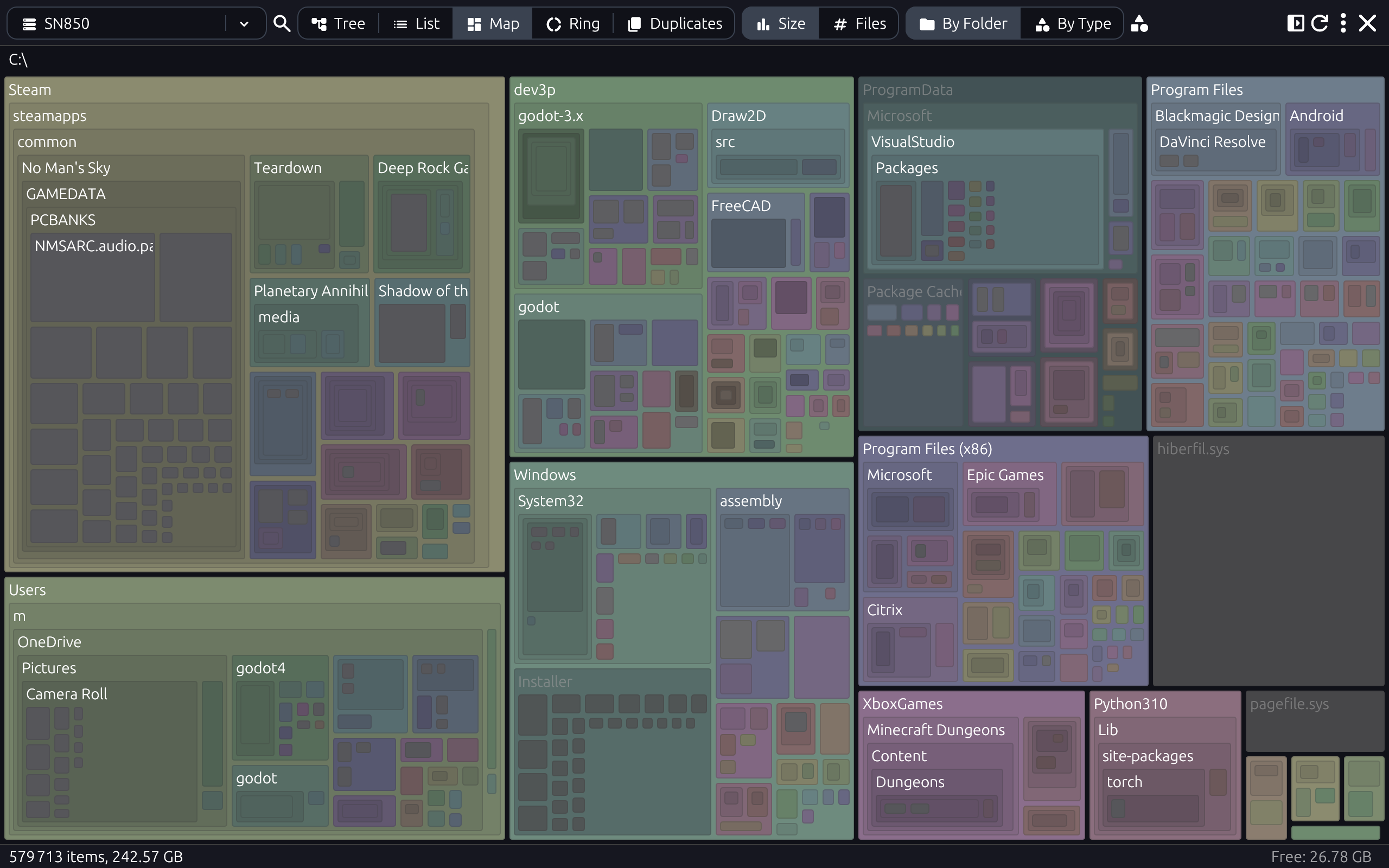
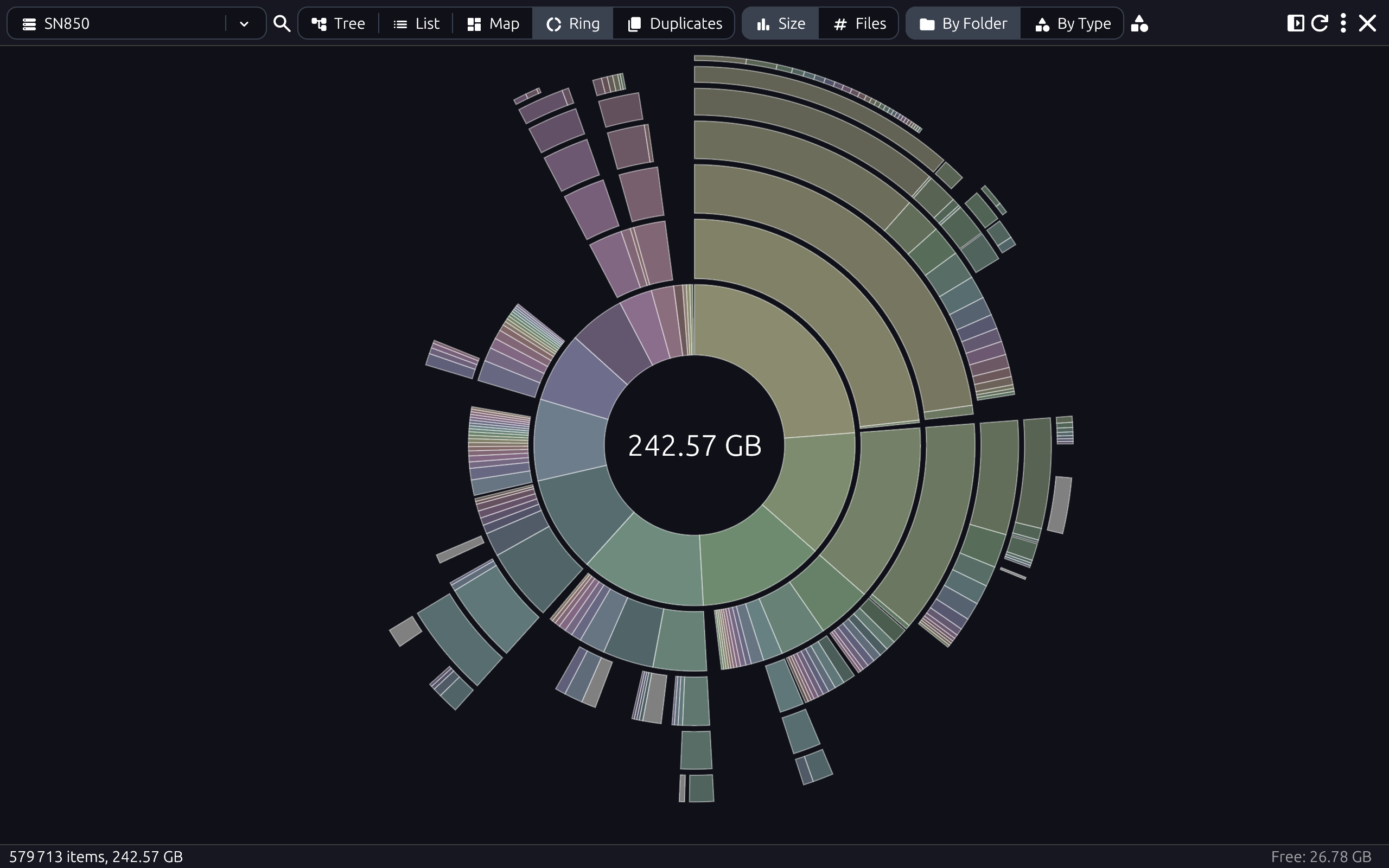
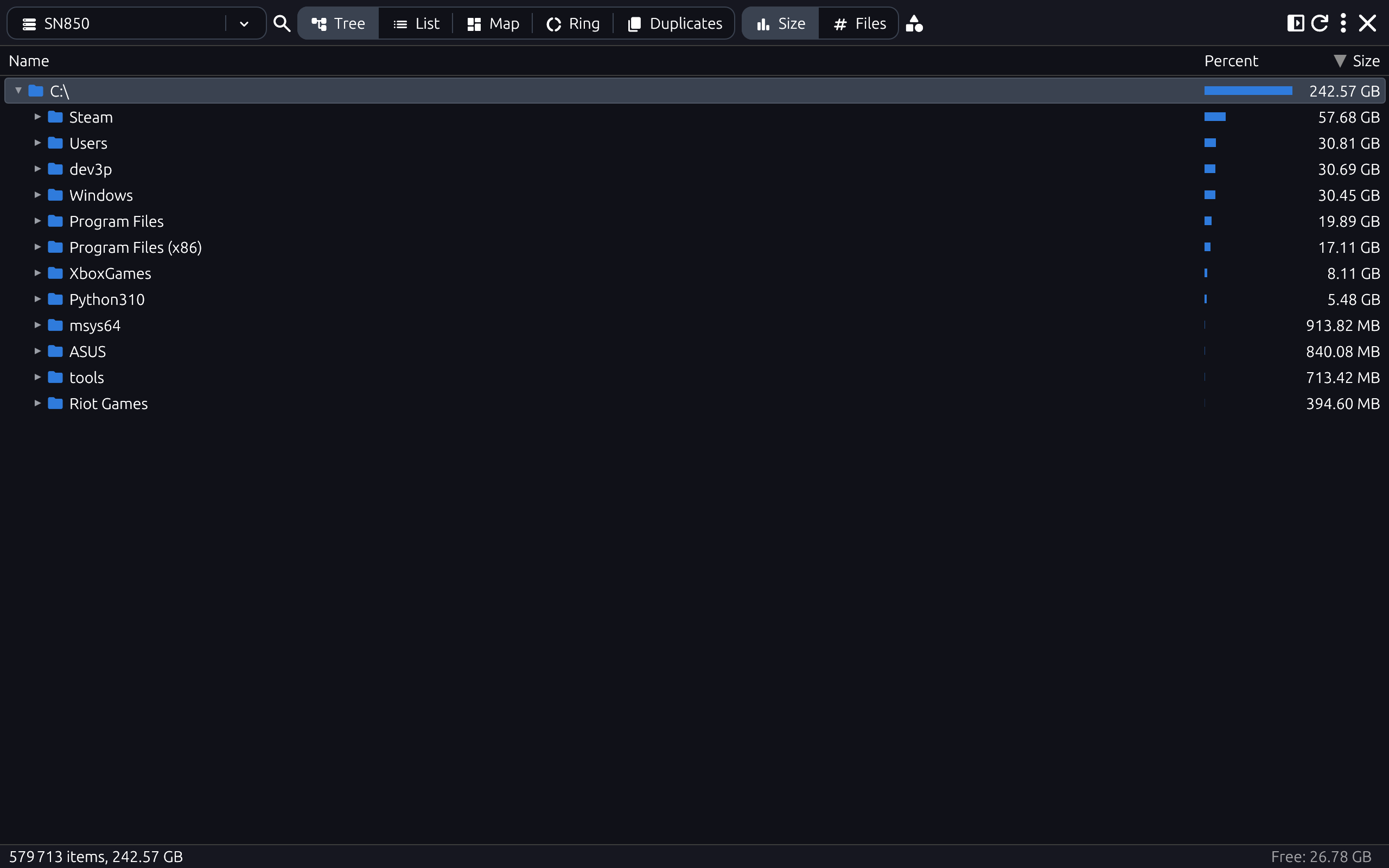
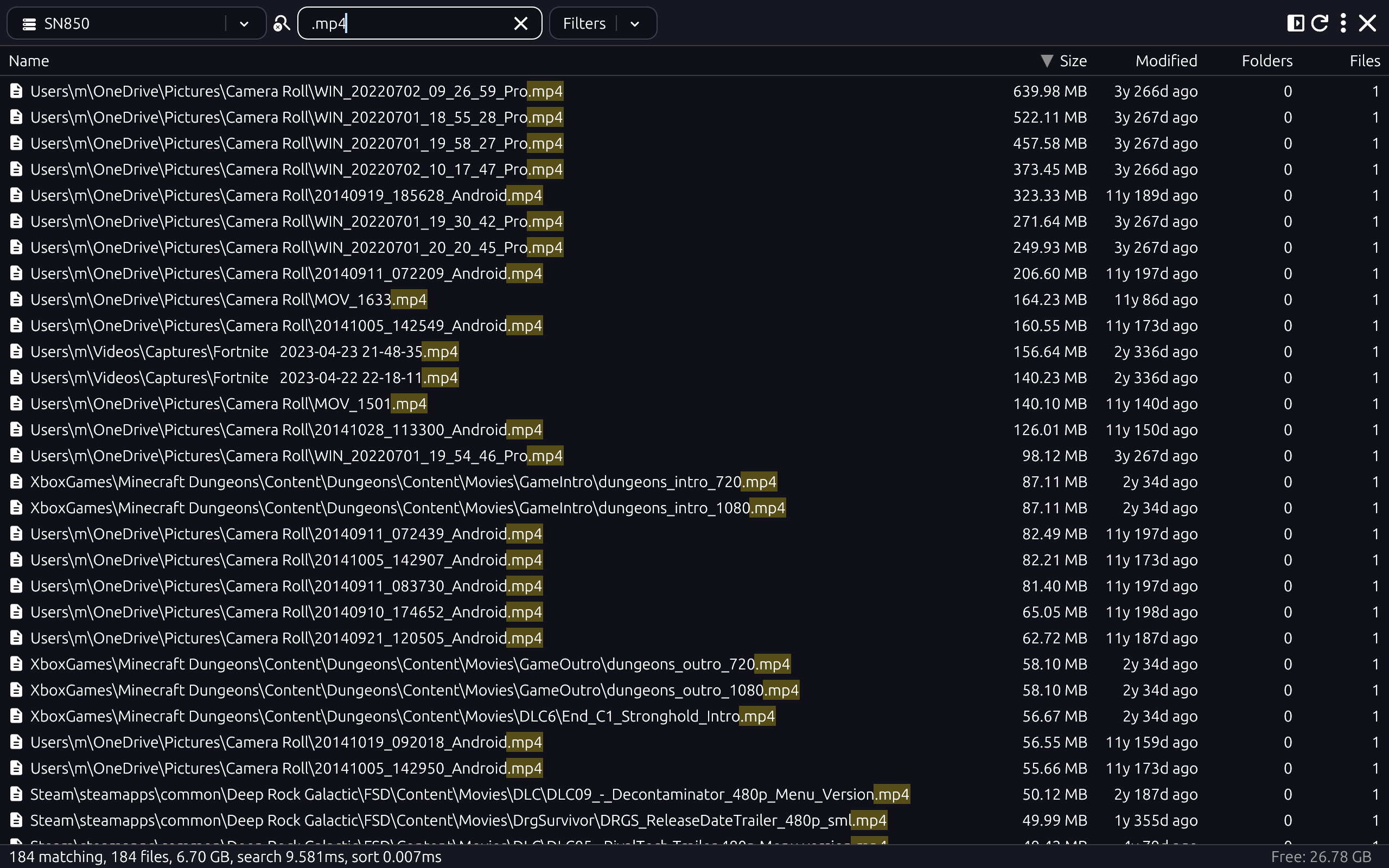
DirMeta shows you where your disk space goes. Scan any folder or drive and see sizes in a tree, list, treemap, or ring chart. Find large files fast, and save snapshots to analyze later—even when the drive is offline. Includes both a graphical app and a CLI.
Analyze disk usage
- Tree and list views — Sort by size, file count, name, or modification date. Resize columns. Switch to Tree, List, Map, or Ring with Cmd+1-4.
- Treemap and ring chart — Visual block and ring views of what's using space; color by folder or by file type. Zoom and pan. Export as SVG for reports or sharing.
Search and duplicates
- Instant search — Find files and folders by name or path (Cmd+F). Search across millions of items; results update as you type.
- Duplicate finder — Mode that surfaces identical files so you can free space safely. Compare and remove duplicates from the same view.
Snapshots
Save any scan as a compact .fssz snapshot and reopen
it anytime without the original drive.
- Offline analysis — Analyze external drives, network shares, or archived data after unplugging. Millions of files load in seconds from a snapshot.
- Point-in-time and shareable — Capture the exact state at a moment; compare snapshots over time. Share a snapshot file so others can explore the same analysis.
- Multiple snapshots — Load and search across several snapshots at once. Compact format stores only metadata, so snapshot files stay small.
Archives and bundles
- Scan inside archives — ZIP, 7Z, RAR, TAR, TGZ and more. See sizes without extracting; expand an archive on demand. Optional password support for encrypted archives.
-
Bundles — macOS
.appbundles, Git repos, and cache dirs (e.g.CACHEDIR.TAG) are shown as single units. Toggle to show bundle contents when you need to dig in.
Everyday actions
- Context menu — Reveal in Finder, copy path, open in Terminal. Rescan a folder or trash items. Scan inside an archive from the tree.
- Categories and extensions — Browse semantic categories or literal filename extensions, with optional matching colors in charts and file icons.
- Options — Show or hide hidden files (Cmd+.). Toggle sidebar (Cmd+B). Available disk space shown in the status bar.
All features completely free to use.
Download
Free to use. Pick your platform and get the latest build.
The Windows download is not yet code-signed. Windows may show a SmartScreen warning when you run it. Choose More info and then Run anyway to use the app.
What's New
0.18.0 — 2026-10-10
Features
- Arrow keys select in Categories; Space toggles in Locations
- Color by file extension and category
- Copy to... supports files inside archives
- Fill Tasks button background with overall progress
- Hash file content and keep integrity baselines
- Identify file roles and browse categories
- Rebuild duplicates in the background and show a folder column
- Save snapshots on demand and auto-save on close
- Up/Down arrow navigation in Categories and Locations lists
Bug Fixes
- Avoid blurry text on lower resolution displays
- Expanding an archive no longer adds its contents to parent folder sizes
- Hide empty command-palette tooltips
Performance Improvements
- skip bundle-flag updates for unchanged nodes
- Speed up the location, tree, and tasks panels
0.17.2 — 2026-10-07
Bug Fixes
- Prefer DX12 over Vulkan on Windows to avoid startup hangs
- Prefer low-power GPU for rendering
0.17.1 — 2026-10-07
Bug Fixes
- Debug startup failure on Windows
- Don't check locale every frame
0.17.0 — 2026-10-07
Features
- Add path matching to the search toolbar
- Improved location multi-selection
- Improved removable drive support
- Match file names with prefix and suffix wildcards
- Resume Windows live views without administrator access
- Search adjacent folder paths with slashes
- Search within folders using breadcrumb navigation
- Show free space on tree root
- Show separate Name and Path columns in Search and List views
- Update toolbar styling
Bug Fixes
- Allow fast NTFS scans on more USB drives
- Classify VHD files as virtual machines
- Enable parent-folder navigation in Tree and List views
- Improve Types columns and Left Arrow navigation
- Keep search filters from affecting other views
- Keep space between text fields and nearby controls
- Preserve file and folder focus across views
Performance Improvements
- Improve performance with live tracking
- Less blocking of UI
0.16.0 — 2026-10-04
Features
- Cleaner Tasks Panel layout
- Favorite locations
- Live drives and folders
- Redesign sidebar with Drives/Offline/Folders sections
Bug Fixes
- Fixed exFAT support on Windows
- include reserved storage and compressed metadata in memory estimates
Performance Improvements
- Improve duplicate view performance
- Improve search and sort performance
- Speed up snapshot loading and saving
0.15.0 — 2026-09-30
Features
- Add tasks panel
- Better scanning and error indicators in tree
- Full application menus
- Improve scanning ordering.
- Improved Copying reporting
- Improved handling of links
- MacOS native application menus
0.14.0 — 2026-09-26
Features
- Add Copy and Move to options
- Cancel copy, move, and trash from the status bar
- Disable Copy, Move, and Trash for items inside an archive
- Remove moved and trashed files from every open snapshot
- Save snapshots after copy, move, and trash
0.13.0 — 2026-09-25
Features
- Select folders from the treemap and ring views
- Select multiple files and folders in the tree, with optional checkboxes
- Show selected size in the status bar, with a toggleable Selection panel
Bug Fixes
- Improve performance when moving window around on Windows
- Toolbar slightly taller
0.12.1 — 2026-09-25
Bug Fixes
- Fix MacOS build
0.12.0 — 2026-09-25
Features
- Improve toolbar icon layout
- New icon
Bug Fixes
- Don't show duplicate tooltips
0.11.0 — 2026-05-29
Features
- Add Linux ARM64 support
Bug Fixes
- Hint text overlapping side panel
- Stop Ignore didn't properly clear ignore until rescan
0.10.1 — 2026-04-13
Bug Fixes
- Fix builds
0.10.0 — 2026-04-09
Features
- Add translation: Chinese (Simplified)
- Add translation: Danish
- Add translation: German
Bug Fixes
- Fix linux build
0.9.0 — 2026-03-27
Features
- Add "Breadcrumb bar" on the ring chart view
- Add "Up" button on breadcrumb bar
- Add Command Palette (Ctrl+Shift+P)
- Add Ignore option. Ignored folders will not be scanned on subsequent scans. Right-click on a folder, choose Ignore
- Much faster scanning of full NTFS drives on Windows
Bug Fixes
- Archives not always detected correctly
- Fix allocated size calculation on Windows
- Improve snapshot load performance
- Performance degradation on very large scans
0.8.0 — 2026-02-24
Features
- Faster snapshot load and save (not backwards compatible)
- Simplify toolbar. Search is a toggle, and Duplicates is part of the main modes.
Bug Fixes
- Exclude deleted items from Map and Ring views
0.7.0 — 2026-02-22
Features
- Support running as portable app (create an empty "snapshots" folder next to the executable)
Bug Fixes
- Only accept shortcut keys (like Cmd+Backspace to Trash) when focused!
0.6.0 — 2026-02-21
Features
- Allow scanning archives with any extension
- Animate side panels
- Synchronize selected item between views
- Update UI styling
Bug Fixes
- Expand and scroll to selected item when switching view
- Fix light theme
- Fix right-click on cards
- Fix right-click on column header
0.5.0 — 2026-02-20
Features
- add --duplicates and --types CLI commands
- implement SVG export functionality for visualizations
0.4.2 — 2026-02-15
Bug Fixes
- build settings
0.4.1 — 2026-02-15
Bug Fixes
- duplicate handle multi-snapshot
- duplicate handle multi-snapshot
- Fix first click on drive combo loading immediately
0.4.0 — 2026-02-14
Features
- Duplicate finder mode
- Load and search multiple snapshots
Bug Fixes
- Time formatting extended to years
0.3.0 — 2026-02-12
Features
- Show available disk space in status bar
Bug Fixes
- Icon shape on MacOS
0.2.1 — 2026-02-12
Bug Fixes
- fix release-please
0.2.0 — 2026-02-12
Features
- Arrow up/down focus to/from search
- Initial release
- Rescan Folder
- Right-arrow scans & expands archives
- Show hidden files option
- Show hidden files option
- Support more archive types (7z, tgz, rar)
Bug Fixes
- Detect hidden files on non-native file systems and network drives
- Enter in search move focus to list (instead of opening first hit)
- Header focus stops
- minor column regressions
- release-please
- Table focus
0.1.0 — 2026-02-11
- Don't rescan after delete (just remove the node)
- Pinch/Scroll Zoom in Map and Ring view
- Arrow key navigation in Map and Ring view
- Tweak start screen design
- Calculate effective size for hardlinks
- Size format options (Auto/GB/MB/KB, base-1000/1024)
- Filter Files/Folders/Errors in search results
- MacOS page up/down, home/end
- Remember toolbar settings
- Re-open last loaded snapshot/drive
- Use different (GPU based) renderer for even smoother performance
- New compacting toolbar layout
- Key "type ahead" completion in tree
- Non-blocking Trashing
- Animation: Visualization state should include: appear/remove at timestamp, so we can animate towards the target size (which may be 0 for removed items)
- Rings and Map: Use Palette to color by Type - use information from Types mode. This probably needs to be centralized (and likely cached?)
- Zoom in/out of Ring Chart and Map. With transition animation for zooms - if it can be accomplished without significant complexity increase.
- Treat .app folders and similar as "bundles", setting the IS_BUNDLE flag. Don't add Nodes for children, but do count them and size them. Add an option for whether to "Show Package/Bundle Contents". Make a helper method for determining whether we're in something that should be bundled. Example criteria: Has a Contents sub-folder with an "Info.plist" file, or has "CACHE.DIR" file, or name == .git contains "HEAD" file.
- Cmd/Ctrl+W OR Ctrl+F4 shortcut close snapshot
- Move Types to a right-side panel instead of a Mode
- Support wildcards in search (space and asterisk)
- Round modified times to not show seconds except when less than a minute.
- Arrow up/down focus to/from search
- Enter in Search move focus to list (instead of opening first hit)
- Enable search during scanning
- Ring Chart View
- Tree Map View - Block style visualization (a la WinDirStat)
- Remove "Last scan:" line in drive/snapshot cards. Show in tooltip.
- Show error message on hover of items with errors (access denied, link etc.)
- Show Hidden Files Option (off by default, shortcut Cmd+.)
- Check hidden files on e.g. exFAT or network filesystems from Mac/Linux. We can't rely on just the dot prefix.
- Tree Header widgets not showing focus (but counting as focus stop)
- Tree should show focus (focused item get a border?)
- Support additional archive types (7z, rar, tgz, tar etc. - using unarc-rs)
- Archive file (inside folder snapshot) not showing spinner while being scanned
- Archive password dialog on expand causes archive to open as if "+ Archive" was used (ie start_archive_scan instead of start_archive_scan_for_node)
- Unify folder and archive scanning
- Add option to refresh parts of a snapshot, given a node id.
- Resizeable Columns
- Keyboard support: Page Up/Down, Home/End support
- Keyboard shortcuts: Ctrl/Cmd+1-4 = switch mode to corresponding mode on Mode switcher
- Keyboard shortcuts: Ctrl+F = switch to search mode AND focus search text input field
- Keyboard shortcuts: Delete / Cmd+Backspace = Trash
- Keyboard shortcuts: Show shortcut keys in tool tips for the relevant controls.
- Fix apple app filename (fsui.app -> DirMeta.app)
- Fix apple icon
- Fix light mode theme
- Copy Path option
- Open in Terminal option
- Some filename characters like danish ÆØÅ are not being shown correctly
- In the tree, render IS_ADDED and IS_DELETED items with different icons (yellow star, red cross, for example).
- Search using thread pool (should work for 10's of millions of nodes)
- For sorting, can we re-use a mutable list of NodeId, key to avoid memory allocs during sort
- Snapshots stored in zip files (maybe with zstd encoding)
- Store disk Label + S/N so we can re-identify on re-mount, even with different mount point/drive letter
- Right-click menu on drive/snapshot cards: Delete snapshot, Delete old snapshots
- Search - mostly like Everything: List view with instant search
- Swap code-generated file/folder icons with ICON_FOLDER, ICON_DESCRIPTION (file), maybe later ICON_VIDEO_FILE etc.
- Blue buttons less blue. Try same style as the cards, but add Icons. ICON_FOLDER_ZIP, ICON_FOLDER, ICON_HISTORY (or ICON_FILE_OPEN).
- Consistent highlight boundary.
- Consistent arrow/hand cursor.
- Don't show root path as part of every node.
- Mode toggle like in Mac's Activity Monitor: A Button-Radio control. Maybe compact to a drop-down if there's not enough room.
- Switching from tree to list doesn't expand to selected node. (that used to work)
- Show Mode toggle while scanning. Disallow Search (maybe?).
- Scanning large network drive slow, and uses significant CPU despite that. Frame lags.
- Size Mode - tree view by
- Files Mode - tree view by file count
- Folders Mode - tree view by folder count (REMOVED AGAIN)
- Advanced Mode - tree view show all columns (Called "All", may remove again)
- Scan into archives (zip, 7z etc.)
- Snapshot of archives (zip, rar, 7z, tgz etc.). Trivial is we have "Scan into archives"
- Archive Explorer - Like 7-Zip and WinRAR UIs. Depends on the two above, but also need actions to extract individual files. Maybe create archives also.
- Drop DM2 format
- Icons. I'd like to trivially add an SVG icon in the app. Currently I'm drawing file and folder node icons by hand, but that should really also come from SVGs. Also, we want a button with icon widget. First up is the Scan, Load and Save buttons.
- Kebab menu for settings. Use actual Menu on MacOS.
- Scanning speed shown at regular intervals to not jitter as much
- UI level "Scanning State" - updated every 250 ms
- UI level stats. Number of files, folders, total size, free space
- Main screen shows list of recent + available drives/folders, along with status (online, last scan, number of files/folders, size, capacity?) - Show as sidebar or modal once something is loaded
- Automatically save scans to users storage. On load, scan the available scans in the side panel as "snapshot cards". For snapshots that match available drives, show a row with the latest scan date under each drives card, and load that snapshot when clicking the drive. For snapshots for full drives, create an "offline" drive card matching the info persisted in the snapshot, and list the snapshot under that. Finally, show per-folder snapshots last, before the remaining Scan/Load buttons.
- Add "Percent" column with a bar filled according to the percentage of root. Don't show text. Use visuals.widgets.active.bg_fill color
- Trim text in Name column if not enough available space. Show full name on mouseover
- Also show files in tree
- Show scanning status in status bar instead of toolbar
- Show scanning speed (items/second)
- Update tree while scanning
- Threaded scanning
- New application icon
- Tree/Flat list option
- Sort indicators to use same icon as collapsible header component (check source for implementation)
- Filter by name
- Drop "No tree actions"
- Add X button in Search field to clear search
- Header cell contents not properly vertically centered - slightly towards to top currently
- Header cells clickable full width
- Enter key Reveal in finder
- File and folder icons
- Integer format
- Lower memory consumption. It seems on the high side (compared to Tree Size Free)
- Centralize Search and add to CLI
- Centralize Sorting and add to CLI
- Use [], not get() + options, in hot sort code. Inside sorting we do a lot of snapshot.nodes.get(id).map(...).unwrap_or(...)
- Sort by Modified + Modified column
- Propagate file modification to parent folder (so they always show latest changed)
- Trigger a UI update every second, so we draw updated modified times counting up
- Add folder_count field and column - propagated up like file_count
- store sparsely, since we're not expecting nearly as many folders as files. Maybe as a Vec
- Change Node.kind to a flags bitset instead. Or maybe rust automatically packs individual bools, in which case we can use that. We'll want bools for isfolder (false means file), is_link, is??, is_deleted, is_added, but also has_files, has_folders (to speed up looking for children/folder_counts etc). Flags with * are not persisted, and only used for temporary state or performance.
- Add transient "IS_PARENT_HIDDEN" flag, and propagate that from parents during scan. is_hidden on a node ORs this with IS_HIDDEN
- Use rust-cache instead of custom Cargo caching in CICD https://github.com/Swatinem/rust-cache/tree/master